import os
import threading
import time
import tkinter as tk
from tkinter import filedialog, messagebox, ttk
from selenium import webdriver
from selenium.webdriver.common.by import By
from selenium.webdriver.chrome.service import Service
from selenium.webdriver.chrome.options import Options
from selenium.webdriver.support.ui import WebDriverWait
from selenium.webdriver.support import expected_conditions as EC
import traceback

def center_window(root, width=800, height=600):
    # Lấy kích thước màn hình
    screen_width = root.winfo_screenwidth()
    screen_height = root.winfo_screenheight()
    # Tính vị trí bắt đầu trục ngang và trục đứng
    aaaxxx = (screen_width // 2) - (width // 2)
    bbbyyy = (screen_height // 2) - (height // 2) - (40)
    # Đặt geometry
    root.geometry(f"{width}x{height}+{aaaxxx}+{bbbyyy}")

class WPUpdaterApp:
    def __init__(self, root):
        self.root = root
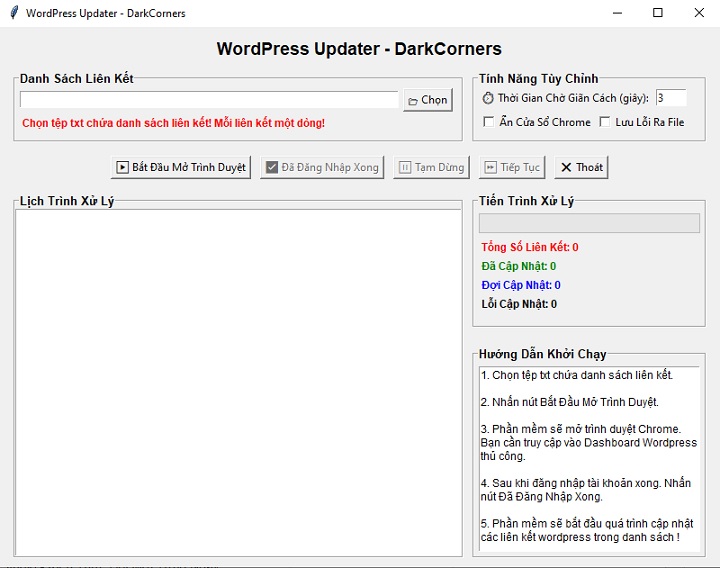
        self.root.title("WordPress Updater - DarkCorners")
        center_window(self.root, 800, 600)
        self.links = []
        self.driver = None
        self.is_paused = False
        self.processing_thread = None
        self.total_links = 0
        self.pending_links = 0
        self.updated_links = 0
        self.error_links = 0
        self.ready_to_process = False
        self.build_ui()

    def build_ui(self):
        # Hàng 1 : Tiêu đề phần mềm
        title_label = tk.Label(self.root, text="WordPress Updater - DarkCorners", font=('Arial', 14, 'bold'))
        title_label.pack(pady=(10, 0))

        # Hàng 2 Bên Trái : Chọn file danh sách liên kết
        top_frame = tk.Frame(self.root)
        top_frame.pack(pady=5, fill='x', padx=10)
        config_frame = tk.LabelFrame(top_frame, text="Danh Sách Liên Kết", font=('Arial', 10, 'bold'), width=500, height=80)
        config_frame.pack(side=tk.LEFT, padx=5, pady=5)
        config_frame.pack_propagate(False)
        file_row = tk.Frame(config_frame)
        file_row.pack(fill='x', padx=5, pady=2)
        self.file_path_entry = tk.Entry(file_row)
        self.file_path_entry.pack(side=tk.LEFT, fill='x', expand=True)
        tk.Button(file_row, text="📂 Chọn", command=self.load_links).pack(side=tk.LEFT, padx=5)
        warning_label = tk.Label(config_frame, text="Chọn tệp txt chứa danh sách liên kết! Mỗi liên kết một dòng!", fg='red', font=('Arial', 9, 'bold'))
        warning_label.pack(anchor='w', padx=5, pady=(0,5))
        # Hàng 2 Bên Phải : Tính năng tùy chỉnh
        option_frame = tk.LabelFrame(top_frame, text="Tính Năng Tùy Chỉnh", font=('Arial', 10, 'bold'), width=300, height=80)
        option_frame.pack(side=tk.LEFT, padx=5, pady=5)
        option_frame.pack_propagate(False)
        delay_frame = tk.Frame(option_frame)
        delay_frame.pack(anchor='w', padx=5, pady=2)
        tk.Label(delay_frame, text="⏱ Thời Gian Chờ Giãn Cách (giây):").pack(side=tk.LEFT)
        self.delay_var = tk.IntVar(value=3)
        tk.Entry(delay_frame, textvariable=self.delay_var, width=5).pack(side=tk.LEFT, padx=5)
        check_frame = tk.Frame(option_frame)
        check_frame.pack(anchor='w', padx=5, pady=2)
        self.headless_var = tk.BooleanVar()
        tk.Checkbutton(check_frame, text="Ẩn Cửa Sổ Chrome", variable=self.headless_var).pack(side=tk.LEFT)
        self.save_errors_var = tk.BooleanVar()
        tk.Checkbutton(check_frame, text="Lưu Lỗi Ra File", variable=self.save_errors_var).pack(side=tk.LEFT)

        # Hàng 3 : Các nút điều khiển
        controls_frame = tk.Frame(self.root)
        controls_frame.pack(pady=5)
        self.start_button = tk.Button(controls_frame, text="▶️ Bắt Đầu Mở Trình Duyệt", command=self.open_browser)
        self.start_button.pack(side=tk.LEFT, padx=5)
        self.continue_button = tk.Button(controls_frame, text="✅ Đã Đăng Nhập Xong", command=self.start_processing, state='disabled')
        self.continue_button.pack(side=tk.LEFT, padx=5)
        self.pause_button = tk.Button(controls_frame, text="⏸️ Tạm Dừng", command=self.pause_processing, state='disabled')
        self.pause_button.pack(side=tk.LEFT, padx=5)
        self.resume_button = tk.Button(controls_frame, text="⏩ Tiếp Tục", command=self.resume_processing, state='disabled')
        self.resume_button.pack(side=tk.LEFT, padx=5)
        self.exit_button = tk.Button(controls_frame, text="❌ Thoát", command=self.root.quit)
        self.exit_button.pack(side=tk.LEFT, padx=5)

        # Hàng 4: Log, tiến trình và hướng dẫn
        middle_frame = tk.Frame(self.root)
        middle_frame.pack(fill='both', expand=True, padx=10, pady=5)
        # Hàng 4 Bên Trái : Lịch trình xử lý
        log_frame = tk.LabelFrame(middle_frame, text="Lịch Trình Xử Lý", font=('Arial', 10, 'bold'), width=500)
        log_frame.pack(side=tk.LEFT, fill='both', padx=5, pady=5)
        log_frame.pack_propagate(False)
        self.log_text = tk.Text(log_frame)
        self.log_text.pack(fill='both', expand=True)
        right_area = tk.Frame(middle_frame, width=300, height=400)
        right_area.pack(side=tk.LEFT, fill='both', expand=True, padx=5, pady=5)
        right_area.pack_propagate(False)
        # Hàng 4 Bên Phải 1 : Tiến trình xử lý
        progress_area = tk.LabelFrame(right_area, text="Tiến Trình Xử Lý", font=('Arial', 10, 'bold'), width=300, height=150)
        progress_area.pack(side=tk.TOP, fill='x', pady=(0, 10))
        progress_area.pack_propagate(False)
        self.progress_var = tk.DoubleVar()
        self.progress = ttk.Progressbar(progress_area, maximum=100, variable=self.progress_var)
        self.progress.pack(fill='x', padx=5, pady=5)
        self.label_total = tk.Label(progress_area, text="Tổng Số Liên Kết: 0", font=('Arial', 9, 'bold'), fg='red')
        self.label_total.pack(anchor='w', padx=5)
        self.label_updated = tk.Label(progress_area, text="Đã Cập Nhật: 0", font=('Arial', 9, 'bold'), fg='green')
        self.label_updated.pack(anchor='w', padx=5)
        self.label_pending = tk.Label(progress_area, text="Đợi Cập Nhật: 0", font=('Arial', 9, 'bold'), fg='blue')
        self.label_pending.pack(anchor='w', padx=5)
        self.label_errors = tk.Label(progress_area, text="Lỗi Cập Nhật: 0", font=('Arial', 9, 'bold'), fg='black')
        self.label_errors.pack(anchor='w', padx=5)
        # Hàng 4 Bên Phải 2 : Hướng dẫn
        guide_frame = tk.LabelFrame(right_area, text="Hướng Dẫn Khởi Chạy", font=('Arial', 10, 'bold'), height=180)
        guide_frame.pack(side=tk.TOP, fill='both', expand=True, pady=(10, 0))
        guide_frame.pack_propagate(False)
        guide_text = tk.Text(guide_frame, wrap='word', font=('Arial', 9), height=8)
        guide_text.insert(tk.END,
          "1. Chọn tệp txt chứa danh sách liên kết.\n\n"
          "2. Nhấn nút Bắt Đầu Mở Trình Duyệt.\n\n"
          "3. Phần mềm sẽ mở trình duyệt Chrome. Bạn cần truy cập vào Dashboard WordPress thủ công.\n\n"
          "4. Sau khi đăng nhập tài khoản xong. Nhấn nút Đã Đăng Nhập Xong.\n\n"
          "5. Phần mềm sẽ bắt đầu quá trình cập nhật các liên kết wordpress trong danh sách !\n\n"
        )
        guide_text.config(state='disabled')
        guide_text.pack(fill='both', expand=True, padx=5, pady=5)

    def log(self, message):
        self.log_text.insert(tk.END, f"{message}\n")
        self.log_text.see(tk.END)

    def update_status(self):
        self.label_total.config(text=f"Tổng Số Liên Kế: {self.total_links}")
        self.label_pending.config(text=f"Đợi Cập Nhật: {self.pending_links}")
        self.label_updated.config(text=f"Đã Cập Nhật: {self.updated_links}")
        self.label_errors.config(text=f"Lỗi Cập Nhật: {self.error_links}")
        if self.total_links:
            self.progress_var.set((self.updated_links + self.error_links) / self.total_links * 100)

    def load_links(self):
        file_path = filedialog.askopenfilename(filetypes=[("Text Files", "*.txt")])
        if not file_path:
            return
        self.file_path_entry.delete(0, tk.END)
        self.file_path_entry.insert(0, file_path)
        with open(file_path, 'r', encoding='utf-8') as f:
            self.links = [line.strip() for line in f if line.strip()]
        self.total_links = len(self.links)
        self.pending_links = len(self.links)
        self.updated_links = 0
        self.error_links = 0
        self.update_status()
        self.log(f"📄 Đã tìm thấy {self.total_links} liên kết từ file bạn chọn.")

    def create_driver(self, headless=False):
        options = Options()
        if headless:
            options.add_argument("--headless=new")
            options.add_argument("--disable-gpu")
            options.add_argument("--no-sandbox")
            options.add_argument("--disable-dev-shm-usage")
        service = Service("chromedriver.exe")
        return webdriver.Chrome(service=service, options=options)

    def open_browser(self):
        self.log("🧱 Đang mở trình duyệt để bạn đăng nhập vào WordPress...")
        headless = self.headless_var.get()
        try:
            self.driver = self.create_driver(headless=headless)
            self.driver.get("https://example.com/wp-admin")
        except Exception as e:
            tb = traceback.format_exc()
            self.log(f"❌ Không thể khởi tạo trình duyệt:\n{tb}")
            messagebox.showerror("Lỗi", f"Không thể mở trình duyệt:\n{e}")
            return
        self.start_button['state'] = 'disabled'
        self.continue_button['state'] = 'normal'

    def start_processing(self):
        self.log("🚀 Bắt đầu xử lý các liên kết sau khi đăng nhập wordpress.")
        self.is_paused = False
        self.total_links = len(self.links)
        self.pending_links = len(self.links)
        self.updated_links = 0
        self.error_links = 0
        self.update_status()
        self.continue_button['state'] = 'disabled'
        self.pause_button['state'] = 'normal'
        self.resume_button['state'] = 'normal'
        self.processing_thread = threading.Thread(target=self.process_links)
        self.processing_thread.start()

    def pause_processing(self):
        self.is_paused = True
        self.log("⏸️ Đã tạm dừng.")

    def resume_processing(self):
        self.is_paused = False
        self.log("▶️ Tiếp tục xử lý các liên kết.")
        self.processing_thread = threading.Thread(target=self.process_links)
        self.processing_thread.start()

    def process_links(self):
        error_links = []
        while self.links:
            if self.is_paused:
                time.sleep(1)
                continue
            link = self.links.pop(0)
            self.log(f"🌐 Đang mở: {link}")
            try:
                self.driver.get(link)
                WebDriverWait(self.driver, 10).until(EC.presence_of_element_located((By.TAG_NAME, "body")))
                time.sleep(self.delay_var.get())
                update_button = WebDriverWait(self.driver, 10).until(EC.element_to_be_clickable((By.ID, "publish")))
                update_button.click()
                self.updated_links += 1
                self.log("✅ Đã cập nhật thành công liên kết vừa mở.")
            except Exception as e:
                self.error_links += 1
                self.log(f"❌ Lỗi: {str(e)}")
                error_links.append(link)
            self.pending_links = len(self.links)
            self.update_status()
        if self.driver:
            self.driver.quit()
        self.log("🎉 Đã hoàn tất cập nhật tất cả liên kết trong tệp danh sách liên kết.")
        if self.save_errors_var.get() and error_links:
            with open("links_error.txt", "w", encoding="utf-8") as f:
                f.write("\n".join(error_links))
            self.log("📅 Đã lưu các liên kết lỗi vào links_error.txt.")

if __name__ == "__main__":
    root = tk.Tk()
    app = WPUpdaterApp(root)
    root.mainloop()