import tkinter as tk
from tkinter import filedialog, messagebox, scrolledtext
import threading
import time
import random
from selenium import webdriver
from selenium.webdriver.chrome.service import Service
from selenium.webdriver.chrome.options import Options
from webdriver_manager.chrome import ChromeDriverManager

def center_window(root, width=800, height=600):
    # Lấy kích thước màn hình
    screen_width = root.winfo_screenwidth()
    screen_height = root.winfo_screenheight()
    # Tính vị trí bắt đầu trục ngang và trục đứng
    aaaxxx = (screen_width // 2) - (width // 2)
    bbbyyy = (screen_height // 2) - (height // 2) - (40)
    # Đặt geometry
    root.geometry(f"{width}x{height}+{aaaxxx}+{bbbyyy}")

class AccessLinksApp:
    def __init__(self, root):
        self.root = root
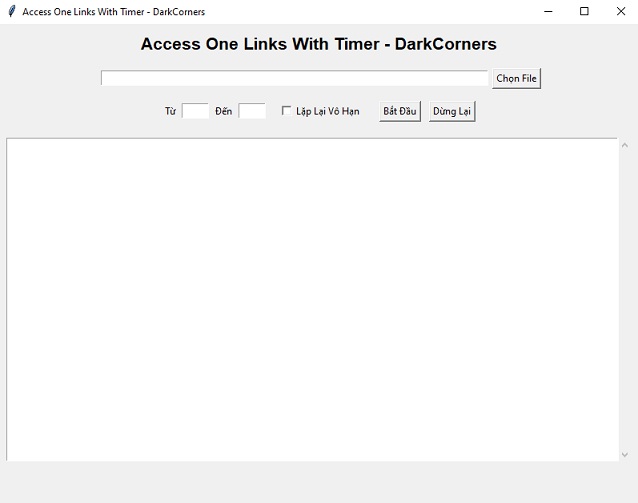
        self.root.title("Access One Links With Timer - DarkCorners")
        center_window(self.root, 800, 600)
        self.links = []
        self.running = False
        self.driver = None

        # Row 1: Title label
        self.title_label = tk.Label(root, text="Access One Links With Timer - DarkCorners", font=("Arial", 16, "bold"))
        self.title_label.pack(pady=10)

        # Row 2: File path and select button
        file_frame = tk.Frame(root)
        file_frame.pack(pady=5)
        self.file_entry = tk.Entry(file_frame, width=80)
        self.file_entry.pack(side=tk.LEFT, padx=5)
        self.browse_button = tk.Button(file_frame, text="Chọn File", command=self.browse_file)
        self.browse_button.pack(side=tk.LEFT)

        # Row 3: Time inputs, checkbox, and control buttons
        controls_frame = tk.Frame(root)
        controls_frame.pack(pady=10)

        tk.Label(controls_frame, text="Từ").pack(side=tk.LEFT)
        self.time_from_entry = tk.Entry(controls_frame, width=5)
        self.time_from_entry.pack(side=tk.LEFT, padx=5)

        tk.Label(controls_frame, text="Đến").pack(side=tk.LEFT)
        self.time_to_entry = tk.Entry(controls_frame, width=5)
        self.time_to_entry.pack(side=tk.LEFT, padx=5)

        self.loop_var = tk.BooleanVar()
        self.loop_checkbox = tk.Checkbutton(controls_frame, text="Lặp Lại Vô Hạn", variable=self.loop_var)
        self.loop_checkbox.pack(side=tk.LEFT, padx=10)

        self.start_button = tk.Button(controls_frame, text="Bắt Đầu", command=self.start)
        self.start_button.pack(side=tk.LEFT, padx=10)

        self.stop_button = tk.Button(controls_frame, text="Dừng Lại", command=self.stop)
        self.stop_button.pack(side=tk.LEFT)

        # Row 4: Log window
        self.log_box = scrolledtext.ScrolledText(root, width=95, height=25, state='disabled')
        self.log_box.pack(pady=10)

    def log(self, message):
        self.log_box.configure(state='normal')
        self.log_box.insert(tk.END, message + '\n')
        self.log_box.configure(state='disabled')
        self.log_box.see(tk.END)

    def browse_file(self):
        file_path = filedialog.askopenfilename(filetypes=[("Text files", "*.txt")])
        if file_path:
            self.file_entry.delete(0, tk.END)
            self.file_entry.insert(0, file_path)

    def read_links(self, path):
        try:
            with open(path, 'r') as f:
                return [line.strip() for line in f.readlines() if line.strip()]
        except Exception as e:
            self.log(f"Lỗi khi đọc file: {e}")
            return []

    def setup_driver(self):
        options = Options()
        options.add_experimental_option("detach", True)  # keep browser open after script ends
        self.driver = webdriver.Chrome(service=Service(ChromeDriverManager().install()), options=options)

    def visit_links(self):
        try:
            self.running = True
            self.setup_driver()
            while self.running:
                for link in self.links:
                    if not self.running:
                        break
                    self.log(f"Mở link: {link}")
                    self.driver.get(link)
                    t1 = int(self.time_from_entry.get())
                    t2 = int(self.time_to_entry.get())
                    delay = random.randint(t1, t2)
                    self.log(f"Chờ {delay} giây...")
                    for _ in range(delay):
                        if not self.running:
                            break
                        time.sleep(1)
                if not self.loop_var.get():
                    break
        except Exception as e:
            self.log(f"Lỗi: {e}")
        self.running = False
        self.log("Đã dừng.")
        if self.driver:
            self.driver.quit()

    def start(self):
        if self.running:
            self.log("Đang chạy...")
            return

        file_path = self.file_entry.get()
        if not file_path:
            messagebox.showerror("Lỗi", "Vui lòng chọn file chứa link")
            return

        try:
            t1 = int(self.time_from_entry.get())
            t2 = int(self.time_to_entry.get())
            if t1 > t2:
                raise ValueError("Giá trị 'Từ' phải nhỏ hơn hoặc bằng 'Đến'")
        except:
            messagebox.showerror("Lỗi", "Vui lòng nhập đúng định dạng thời gian")
            return

        self.links = self.read_links(file_path)
        if not self.links:
            messagebox.showerror("Lỗi", "Không tìm thấy link hợp lệ trong file")
            return

        threading.Thread(target=self.visit_links, daemon=True).start()

    def stop(self):
        self.running = False
        if self.driver:
            try:
                self.driver.quit()
            except:
                pass

if __name__ == '__main__':
    root = tk.Tk()
    app = AccessLinksApp(root)
    root.mainloop()