import os
import threading
import queue
import time
from pathlib import Path
from PIL import Image
import tkinter as tk
from tkinter import ttk
from tkinter import filedialog, messagebox

SUPPORTED_EXT = ('.png', '.jpg', '.jpeg', '.webp')
ICON_SIZE = (256, 256)

def center_window(root, width=800, height=600):
    # Lấy kích thước màn hình
    screen_width = root.winfo_screenwidth()
    screen_height = root.winfo_screenheight()
    # Tính vị trí bắt đầu trục ngang và trục đứng
    aaaxxx = (screen_width // 2) - (width // 2)
    bbbyyy = (screen_height // 2) - (height // 2) - (40)
    # Đặt geometry
    root.geometry(f"{width}x{height}+{aaaxxx}+{bbbyyy}")

class ImagesToICOConverter(tk.Tk):
    def __init__(self):
        super().__init__()
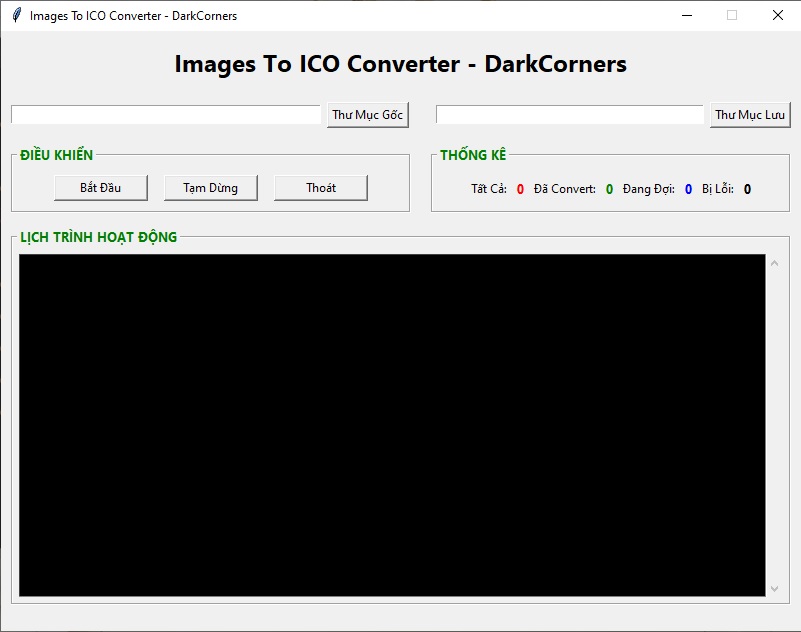
        self.title('Images To ICO Converter - DarkCorners')
        self.resizable(False, False)
        center_window(self, 800, 600)
        # State
        self.input_dir = tk.StringVar(value='')
        self.output_dir = tk.StringVar(value='')
        self.total_files = tk.IntVar(value=0)
        self.converted_files = tk.IntVar(value=0)
        self.error_files = tk.IntVar(value=0)
        self.pending_files = tk.IntVar(value=0)
        # Worker control
        self.file_queue = queue.Queue()
        self.event_queue = queue.Queue()  # for GUI updates from worker
        self.worker_thread = None
        self.stop_event = threading.Event()
        self.pause_event = threading.Event()  # when set => paused
        self._build_ui()
        # poll event queue to update GUI
        self.after(200, self._process_event_queue)

    def _build_ui(self):
        # Row 1 - title label
        title_lbl = tk.Label(self, text='Images To ICO Converter - DarkCorners', font=('Segoe UI', 18, 'bold'))
        title_lbl.pack(pady=(12, 12))

        # Row 2 - input/output selectors
        row2 = tk.Frame(self, width=800, height=40)
        row2.pack_propagate(False)
        row2.pack(pady=(2, 2))
        left_frame = tk.Frame(row2, width=400, height=40)
        right_frame = tk.Frame(row2, width=400, height=40)
        left_frame.pack(side='left')
        right_frame.pack(side='right')
        # Input chooser (single row, entry + button)
        input_entry = tk.Entry(left_frame, textvariable=self.input_dir, width=51)
        input_entry.pack(side='left', padx=(10,6))
        input_btn = tk.Button(left_frame, text='Thư Mục Gốc', command=self.choose_input)
        input_btn.pack(side='left', padx=(0,10))
        # Output chooser
        output_entry = tk.Entry(right_frame, textvariable=self.output_dir, width=44)
        output_entry.pack(side='left', padx=(10,6))
        output_btn = tk.Button(right_frame, text='Thư Mục Lưu', command=self.choose_output)
        output_btn.pack(side='left', padx=(0,10))

        # Row 3 - controls and stats within LabelFrames
        row3 = tk.Frame(self, width=800, height=70)
        row3.pack_propagate(False)
        row3.pack(pady=(6,6))
        # Left labelframe: ĐIỀU KHIỂN
        ctrl_label = tk.Label(self, text='ĐIỀU KHIỂN', font=('Segoe UI', 10, 'bold'), fg='green')
        self.ctrl_lf = tk.LabelFrame(row3, labelwidget=ctrl_label, width=400, height=70)
        self.ctrl_lf.pack(side='left', padx=10)
        self.ctrl_lf.pack_propagate(False)
        btn_frame = tk.Frame(self.ctrl_lf)
        btn_frame.pack(expand=True)
        start_btn = tk.Button(btn_frame, text='Bắt Đầu', width=12, command=self.start)
        pause_btn = tk.Button(btn_frame, text='Tạm Dừng', width=12, command=self.toggle_pause)
        exit_btn = tk.Button(btn_frame, text='Thoát', width=12, command=self.exit_app)
        start_btn.pack(side='left', padx=8, pady=5)
        pause_btn.pack(side='left', padx=8, pady=5)
        exit_btn.pack(side='left', padx=8, pady=5)
        # save references to change Pause label later
        self._pause_btn = pause_btn
        # Right labelframe: THỐNG KÊ
        stats_label = tk.Label(self, text='THỐNG KÊ', font=('Segoe UI', 10, 'bold'), fg='green')
        self.stats_lf = tk.LabelFrame(row3, labelwidget=stats_label, width=400, height=70)
        self.stats_lf.pack(side='right', padx=10)
        self.stats_lf.pack_propagate(False)
        stats_frame = tk.Frame(self.stats_lf)
        stats_frame.pack(expand=True)
        # Create counters inline
        # [Tất Cả: xx] [Đã Convert: xx] [Đang Đợi: xx] [Bị Lỗi: xx]
        lbl_total = tk.Label(stats_frame, text='Tất Cả:')
        val_total = tk.Label(stats_frame, textvariable=self.total_files, font=('Segoe UI', 10, 'bold'), fg='red')
        lbl_converted = tk.Label(stats_frame, text='Đã Convert:')
        val_converted = tk.Label(stats_frame, textvariable=self.converted_files, font=('Segoe UI', 10, 'bold'), fg='green')
        lbl_pending = tk.Label(stats_frame, text='Đang Đợi:')
        val_pending = tk.Label(stats_frame, textvariable=self.pending_files, font=('Segoe UI', 10, 'bold'), fg='blue')
        lbl_error = tk.Label(stats_frame, text='Bị Lỗi:')
        val_error = tk.Label(stats_frame, textvariable=self.error_files, font=('Segoe UI', 10, 'bold'), fg='black')
        # pack inline
        for widget in [lbl_total, val_total, lbl_converted, val_converted, lbl_pending, val_pending, lbl_error, val_error]:
            widget.pack(side='left', padx=2)

        # Row 4 - logs frame
        logs_label = tk.Label(self, text='LỊCH TRÌNH HOẠT ĐỘNG', font=('Segoe UI', 10, 'bold'), fg='green')
        self.logs_lf = tk.LabelFrame(self, labelwidget=logs_label, width=780, height=380)
        self.logs_lf.pack(pady=(6,10))
        self.logs_lf.pack_propagate(False)
        # Text widget for logs with black background and white text
        logs_frame = tk.Frame(self.logs_lf)
        logs_frame.pack(fill='both', expand=True, padx=6, pady=6)
        self.log_text = tk.Text(logs_frame, bg='black', fg='white', state='disabled', wrap='word')
        self.log_text.pack(side='left', fill='both', expand=True)
        scroll = tk.Scrollbar(logs_frame, command=self.log_text.yview)
        scroll.pack(side='right', fill='y')
        self.log_text['yscrollcommand'] = scroll.set

        # window close protocol
        self.protocol('WM_DELETE_WINDOW', self.exit_app)

    # ---------------- UI actions ----------------
    def choose_input(self):
        d = filedialog.askdirectory()
        if d:
            self.input_dir.set(d)

    def choose_output(self):
        d = filedialog.askdirectory()
        if d:
            self.output_dir.set(d)

    def start(self):
        input_dir = self.input_dir.get().strip()
        output_dir = self.output_dir.get().strip()
        if not input_dir or not os.path.isdir(input_dir):
            messagebox.showwarning('Chú ý', 'Vui lòng chọn thư mục Input hợp lệ')
            return
        if not output_dir or not os.path.isdir(output_dir):
            messagebox.showwarning('Chú ý', 'Vui lòng chọn thư mục Output hợp lệ')
            return
        # If a worker is already running, ignore start
        if self.worker_thread and self.worker_thread.is_alive():
            self._log('Worker đang chạy — thao tác Start bị bỏ qua')
            return
        # gather files
        files = []
        for root, _, filenames in os.walk(input_dir):
            for fn in filenames:
                if fn.lower().endswith(SUPPORTED_EXT):
                    files.append(os.path.join(root, fn))
        # reset counters
        self.total_files.set(len(files))
        self.converted_files.set(0)
        self.error_files.set(0)
        self.pending_files.set(len(files))
        # fill queue
        while not self.file_queue.empty():
            try: self.file_queue.get_nowait()
            except queue.Empty: break
        for f in files:
            self.file_queue.put(f)
        # reset control events
        self.stop_event.clear()
        self.pause_event.clear()
        # start worker
        self.worker_thread = threading.Thread(target=self._worker, args=(input_dir, output_dir), daemon=True)
        self.worker_thread.start()
        self._log(f'Bắt đầu xử lý {len(files)} file')

    def toggle_pause(self):
        if not (self.worker_thread and self.worker_thread.is_alive()):
            # no worker running
            self._log('Không có tiến trình nào để tạm dừng/tiếp tục')
            return
        if not self.pause_event.is_set():
            # pause
            self.pause_event.set()
            self._pause_btn.config(text='Tiếp Tục')
            self._log('Đã tạm dừng')
        else:
            # resume
            self.pause_event.clear()
            self._pause_btn.config(text='Tạm Dừng')
            self._log('Tiếp tục xử lý')

    def exit_app(self):
        if messagebox.askokcancel('Thoát', 'Bạn có chắc muốn thoát không?'):
            # signal worker to stop
            self.stop_event.set()
            # if paused, resume so worker can exit cleanly
            self.pause_event.clear()
            # wait a short time for thread to finish
            if self.worker_thread and self.worker_thread.is_alive():
                self._log('Đang chờ worker dừng...')
                self.worker_thread.join(timeout=2)
            self.destroy()

    # ---------------- worker and processing ----------------
    def _worker(self, input_dir, output_dir):
        while not self.stop_event.is_set():
            try:
                filepath = self.file_queue.get_nowait()
            except queue.Empty:
                break
            # pause handling
            while self.pause_event.is_set() and not self.stop_event.is_set():
                time.sleep(0.2)

            if self.stop_event.is_set():
                break
            try:
                # perform conversion
                rel_path = os.path.relpath(filepath, input_dir)
                filename = os.path.splitext(os.path.basename(filepath))[0]
                out_path = os.path.join(output_dir, filename + '.ico')
                self._log(f'Chuyển: {rel_path} -> {out_path}')
                self._convert_image_to_ico(filepath, out_path)
                # update counters via event queue
                self.event_queue.put(('converted', filepath))
                self._log(f'Hoàn thành: {rel_path}')
            except Exception as e:
                self.event_queue.put(('error', filepath))
                self._log(f'Lỗi khi xử lý {filepath}: {e}')
            # small sleep to give GUI breathing room when many files
            time.sleep(0.02)
        self.event_queue.put(('finished', None))
        self._log('Worker kết thúc')

    def _convert_image_to_ico(self, src, dst):
        # Using Pillow to open and save as .ico with size 256x256
        with Image.open(src) as im:
            # convert to RGBA to preserve transparency if any
            if im.mode not in ('RGBA', 'RGB'):
                im = im.convert('RGBA')
            # resize while keeping aspect by fitting into ICON_SIZE with possible alpha
            im.thumbnail(ICON_SIZE, Image.LANCZOS)
            # create a new image of ICON_SIZE with transparent background and paste centered
            final = Image.new('RGBA', ICON_SIZE, (0,0,0,0))
            x = (ICON_SIZE[0] - im.width) // 2
            y = (ICON_SIZE[1] - im.height) // 2
            final.paste(im, (x, y), im if 'A' in im.getbands() else None)
            # Save as ICO. Pillow will write a valid .ico file. Use sizes parameter for safety.
            final.save(dst, format='ICO', sizes=[ICON_SIZE])

    # ---------------- event queue processing for GUI updates ----------------
    def _process_event_queue(self):
        processed_any = False
        while True:
            try:
                ev, payload = self.event_queue.get_nowait()
            except queue.Empty:
                break
            processed_any = True
            if ev == 'converted':
                self.converted_files.set(self.converted_files.get() + 1)
            elif ev == 'error':
                self.error_files.set(self.error_files.get() + 1)
            elif ev == 'finished':
                pass
            # update pending count = total - converted - errors
            pending = max(0, self.total_files.get() - self.converted_files.get() - self.error_files.get())
            self.pending_files.set(pending)
        # also periodically update pending if queue size changed externally
        if not processed_any:
            # sync pending with actual queue size if worker running
            if self.worker_thread and self.worker_thread.is_alive():
                qsize = self.file_queue.qsize()
                # qsize is number of yet-to-be-processed files
                # but total includes everything, so pending = qsize
                self.pending_files.set(qsize)
        self.after(200, self._process_event_queue)

    # ---------------- logging ----------------
    def _log(self, text):
        ts = time.strftime('%Y-%m-%d %H:%M:%S')
        msg = f'[{ts}] {text}\n'
        # Put into text widget in main thread by scheduling
        def append():
            self.log_text.configure(state='normal')
            self.log_text.insert('end', msg)
            self.log_text.see('end')
            self.log_text.configure(state='disabled')
        # schedule append on main thread
        self.after(1, append)

if __name__ == '__main__':
    app = ImagesToICOConverter()
    app.mainloop()